| View previous topic :: View next topic |
| Author |
Message |
nikokolas87
Joined: 11 Feb 2012
Posts: 5
|
 Posted: Sat Feb 11, 2012 5:56 pm Post subject: Problem with GD SF VI Posted: Sat Feb 11, 2012 5:56 pm Post subject: Problem with GD SF VI |
 |
|
Hello everybody, I am new here and it's been a long time since I wanted to post something here but I wanted to try everything on my own before asking for help. Anyway I finally managed to configure ucon64 and I bought a parralel cable in order to transfert converted roms into my GD SFVI. But when I want to transfert the game into the GD SFVI, I get this message ERROR: GD SRAM file size must be 32768 or 33280 bytes. WTF is that? did I do something wrong with ucon or what? I bought my GD SFVI 2 month ago when I went back to HK. I really need help.
Thank you guys.
|
|
| Back to top |
|
 |
MottZilla
Joined: 08 Sep 2004
Posts: 765
|
| Posted: Sun Feb 12, 2012 3:04 am Post subject: |
|
|
| You must be uploading a SRAM file rather than the rom, atleast according to ucon64 or the gdsf6. Try using floppies and see if it works.
|
|
| Back to top |
|
|
ly63
Joined: 12 Feb 2012
Posts: 9
Location: China
|
| Posted: Sun Feb 12, 2012 9:12 am Post subject: |
|
|
check the command line options.
for transmit ROM to GD,you should use "--xgd6"(or "--xgd3"), not "--xgd6s"(or "--xgd3s"),it's for transmiting SRM file.
|
|
| Back to top |
|
|
nikokolas87
Joined: 11 Feb 2012
Posts: 5
|
| Posted: Sun Feb 12, 2012 7:28 pm Post subject: |
|
|
| Hi, thank you for your advice, yes I was trying to send Sram instead of ROM. But now I am facing another problem because when I try to send the rom into my GD6, I get an error message saying that ucon64 stopped working. Sometimes it starts to send the game into the GD but then it is cancelled because Ucon has stopped working. What should I do?
|
|
| Back to top |
|
|
nikokolas87
Joined: 11 Feb 2012
Posts: 5
|
| Posted: Sun Feb 12, 2012 7:32 pm Post subject: |
|
|
Look at the pic I've attached please.
| Description: |
|
| Filesize: |
91.02 KB |
| Viewed: |
4592 Time(s) |

|
|
|
| Back to top |
|
|
ly63
Joined: 12 Feb 2012
Posts: 9
Location: China
|
| Posted: Mon Feb 13, 2012 3:04 am Post subject: |
|
|
maybe the ioport direct access layer causes the problem
use inpout32 recommend.It 's also support windows 7 64bit(I'm using win7 x64 now,and ucon64 works fine).
here is the link:http://www.highrez.co.uk/Downloads/InpOut32/default.htm
last version is 1.50
|
|
| Back to top |
|
|
nikokolas87
Joined: 11 Feb 2012
Posts: 5
|
| Posted: Wed Feb 15, 2012 7:31 pm Post subject: |
|
|
| Hi, I tried what you told me but I still have a problem when I send the game into the GD sfVI. My friend gave me a usb floppy disk driver and it works so I am not going to bother me with the com port anymore. Thank you all for your responses by the way!
|
|
| Back to top |
|
|
ly63
Joined: 12 Feb 2012
Posts: 9
Location: China
|
| Posted: Fri Feb 17, 2012 6:07 am Post subject: |
|
|
| nikokolas87 wrote: | | Hi, I tried what you told me but I still have a problem when I send the game into the GD sfVI. My friend gave me a usb floppy disk driver and it works so I am not going to bother me with the com port anymore. Thank you all for your responses by the way! |
Every problem has a solution, you can fix it if you really want.
Since I do'nt know detailed infomation about the problem you have encountered,it‘s hard to guess what happened.
Futher infomation about IO port direct access layer:
Windows NT kernel does not allow user program(such as Ucon64) access IO port directly, if a program want to do so, it must use a kernel mode driver.
Inpout32 is a program which can do such work.
Instructions about how to use UCON64 with inpout32:
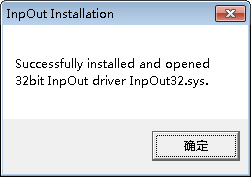
1.Before using inpout32,you must first install it, extract all files from InpOutBinaries_1500.zip to your HDD(such as E:\),run the installer "InstallDriver.exe",
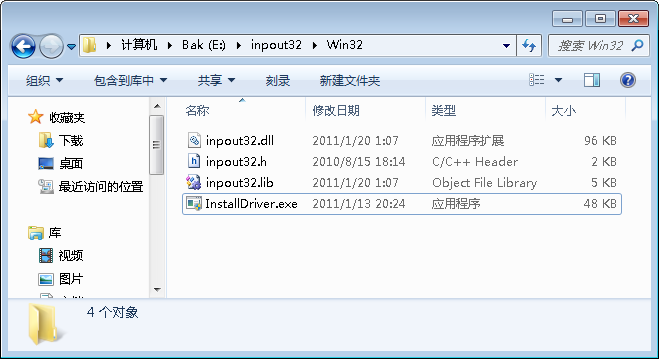
then the Kernel mode driver will be installed on you system.
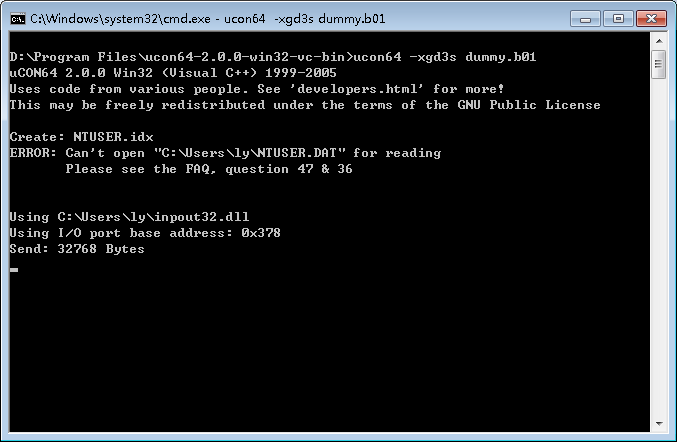
2.Copy inpout32.dll to UCON64's configuration directory.(Default Path is "C:\Documents and settings\your user name\", if you are using Windows XP)
That's all. Ucon64 may send files to your gdsf now.
Note:
The Parallel port settings in you pc's bios should be SPP(or Normal).
EPP mode should work too,but using --xgd6,--xgd6s, --xgd6r option will fail.
==============EOF==================
| Description: |
|
| Filesize: |
18.18 KB |
| Viewed: |
4539 Time(s) |

|
| Description: |
|
| Filesize: |
3.58 KB |
| Viewed: |
4539 Time(s) |

|
| Description: |
|
| Filesize: |
32.07 KB |
| Viewed: |
4539 Time(s) |

|
|
|
| Back to top |
|
|
nikokolas87
Joined: 11 Feb 2012
Posts: 5
|
| Posted: Wed Feb 29, 2012 6:00 pm Post subject: |
|
|
| Oh thank you very much I think I am going to try what you've been showing me because it's more convenient. Thanks a lot
|
|
| Back to top |
|
|
|

 FAQ
FAQ Search
 Memberlist
 Usergroups
 Register
 Profile
 Log in to check your private messages
 Log in


